

Mithilss/neurips-2025-paperswithcode-artifacts: 3.4k NeurIPS 2025 papers, about 900 with an official repository), the reward is verifiable (URL match vs. ground truth), and the harness is a plain agent loop with nothing Veri-specific in it.
Harness training is experimental — expect rough edges on the GPU path and please report them. This spends real GPU credit; check your balance with
veri billing balance first.Prerequisites
- Install the SDK:
pip install 'veri-sdk[mcp]'in a Python 3.10+ virtualenv (the stock macOSpython3is too old), andpip install datasetsfor the dataset prep script - Authenticate:
veri login(or setVERI_API_KEY) - Read the concept page once: Harness-in-the-loop RL (the env contract below is what makes the “unmodified harness” part work)
1. Dataset prep
The HF dataset hasarxiv_id / title as inputs and repositories / project_pages lists as ground truth — but no prompt column, so we synthesize it. We keep rows with an official repository (cleanest ground truth), and each row gets one of five phrasing variants so the policy doesn’t overfit a single template. This is the whole “port”: JSONL in, JSONL out, no environment spec:
prep_dataset.py
verify_tasks.py runs the same lookup the harness performs and keeps the winnable rows (about 9 in 10 papers pass). Run it after prep_dataset.py:
verify_tasks.py
veri datasets upload tasks.jsonl --name paper-url-extraction → note the dataset id.
2. Reward function: score the finished trajectory
A TRL-format reward with partial credit — 0.7 for the GitHub URL, +0.3 for the project page when one is labeled.completions is the trajectory’s final assistant message; extra dataset columns arrive as lists:
reward.py
--reward reward.py in step 4).
3. The harness: your agent, unchanged
Nothing Veri-specific in any of these — the rollout redirects the SDK with env vars alone (ANTHROPIC_BASE_URL / OPENAI_BASE_URL, plus the task in VERI_TASK_INPUT and the served model name in VERI_POLICY_MODEL). Pick the stack your production harness already uses:
- Anthropic (Claude-style tools)
- OpenAI SDK
- LangChain
agent.py (the default) uses native tool_use blocks over the Anthropic messages API. The model calls web_fetch, the harness executes it and returns tool_result:agent.py
--harness-protocol anthropic. This is the same harness shape as the Claude Agent SDK (its Bash / Read / WebFetch loop) over the identical /v1/messages protocol — see the caveats below.requirements.txt
4. Submit
agent.py (the Anthropic tab) is the tool_use harness. Submit it with the matching protocol, from the directory that holds reward.py and harness/:
Harness jobs need 2 to 8 GPUs on one node: the trainer and the vLLM policy server must sit on different CUDA devices (see GPU layout).
--gpu-count 4 is the veri run-harness default (veri-sdk 0.2.45 or later; older CLIs default to 1, which the API rejects), and the CLI refuses a count outside 2 to 8 before it uploads ./harness. On AWS the smallest multi-L4 node is the 4-GPU g6.12xlarge; 2x/4x H100 chunks are available with --provider vast.--entrypoint "python agent_openai.py" and drop --harness-protocol (openai is the default). LangChain: --entrypoint "python agent_langchain.py". The Anthropic text route shown above trains with the same token fidelity.
One node hosts everything: the trainer on GPU 0, the policy server tensor-parallel across GPUs 1–3, and the rollouts. A 4B policy fits comfortably on the 4x L4 node.
5. Watch it learn
Open the job in the dashboard — the Trajectories archive sits right below the logs on harness jobs. Pick a policy step, pick a task, compare the N trials: full message history of every turn, tool calls, per-turn token counts, and the reward. Flip between step 0 and the latest step to see behavior change.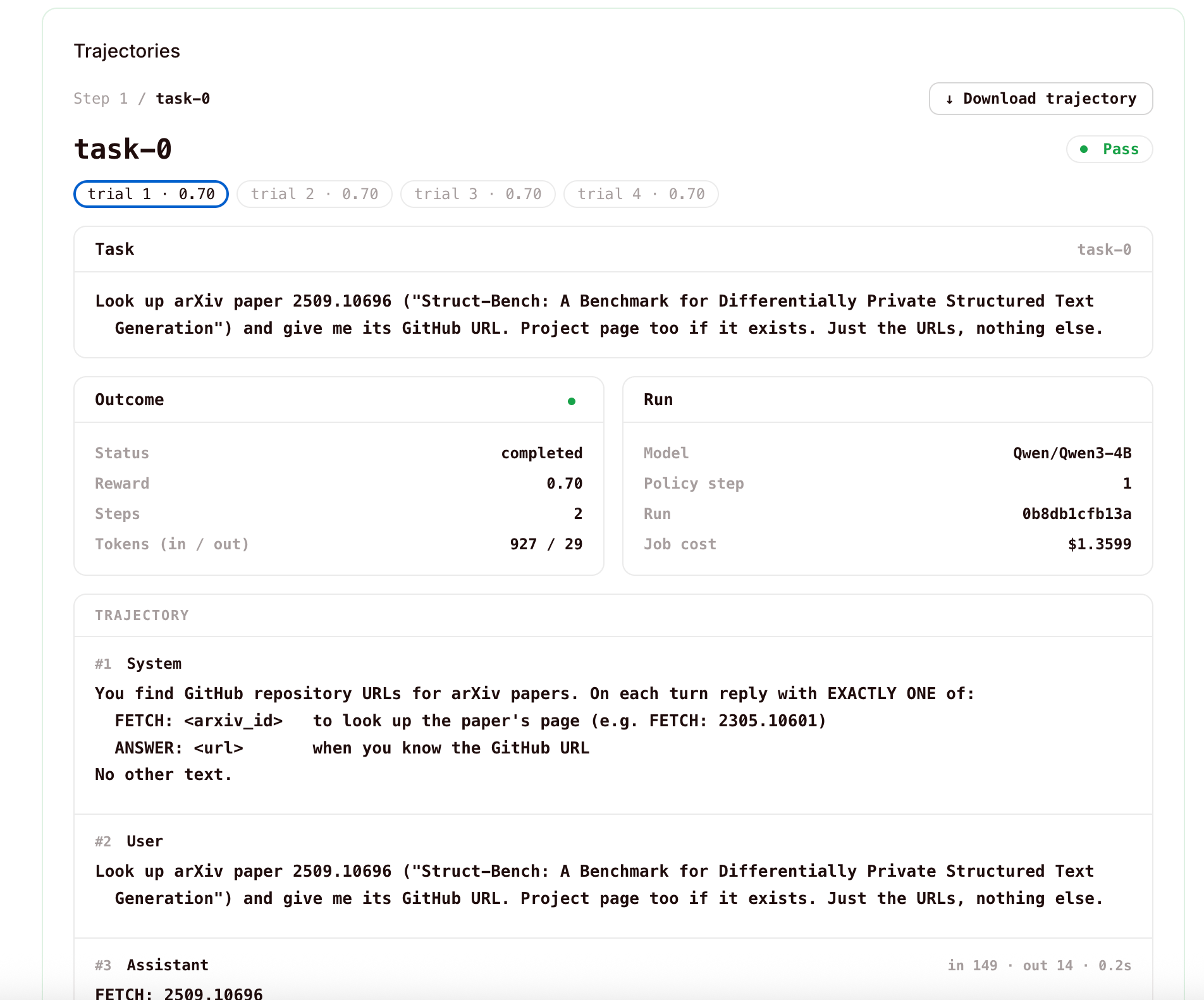
A per-trial trajectory page: task, outcome (reward, turns, tokens), and the full message-by-message conversation.
6. Deploy the result
The trained checkpoint is on the job like any managed run. Save it as a model, deploy that model, and point the same harness at the deployment endpoint:veri deploy only deploys Hugging Face repos, so use veri deployments create --from-model for a saved model.
Config-file form
veri run accepts the same job as TOML. Upload the harness directory first (client.code_artifacts.upload("./harness") returns an artifact id), then run veri run configs/harness.toml:
configs/harness.toml